Context-aware design reviews
Findings land ranked, wired to the exact part, with a one-click diff.
In hardware, small mistakes lead to big disasters, and slow iteration kills momentum. Circuitly puts agents to work in your existing electronics ecosystem so you ship better, faster.
Findings land ranked, wired to the exact part, with a one-click diff.
Routing, schematics, and layout checked against stock, PLM constraints, and your libraries.
Agents grounded in real parts, real tolerances, real boards.
Native KiCad, Altium, and Cadence files under version control. No importing.
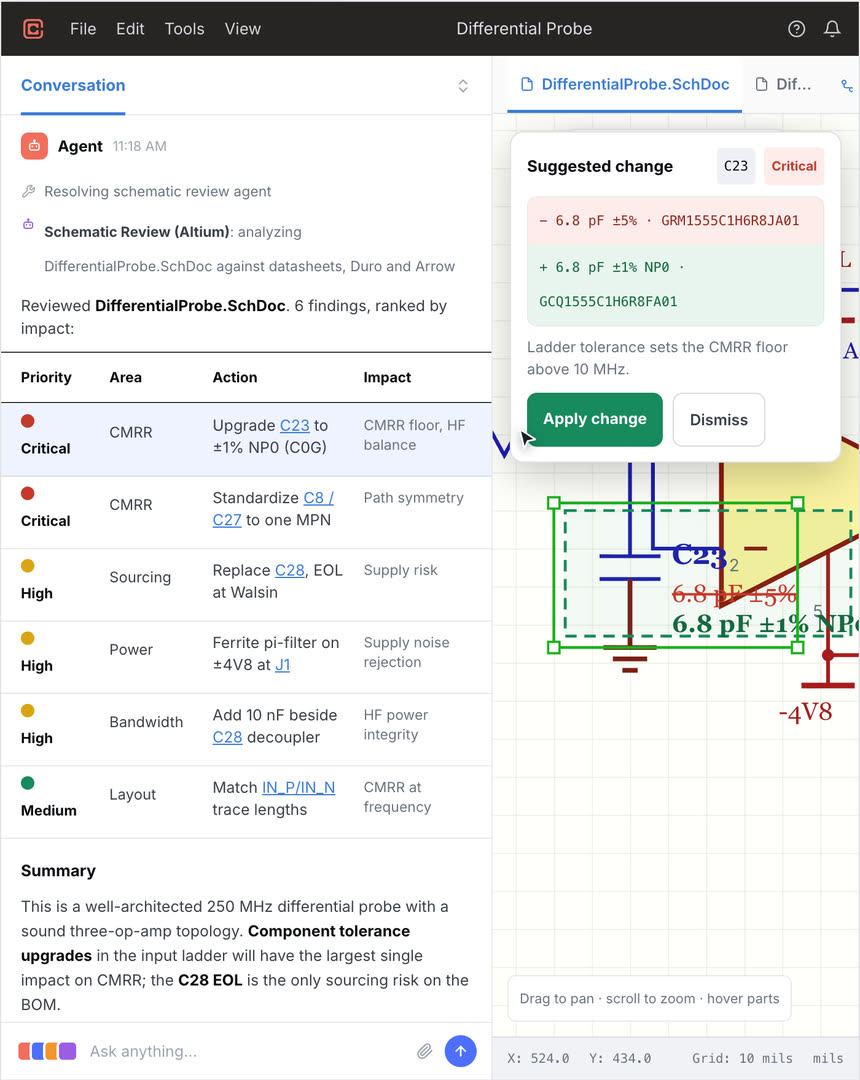
An agent review on a real differential probe design: findings ranked by impact, a suggested change with datasheet evidence, and an engineer-approved diff.
Start with a review, build your library to your standards, or make Circuitly the harness for your whole AI strategy. Engineers stay in the loop at every step.
Schematic, PCB, and whole-design reviews with full context from your PLM and Git: requirements, BOM data, and revision history included.
Create symbols and footprints to your own standards and taste. Iterate with agents and skills that capture your conventions and enforce them across your global library.
Circuitly manages the context and tools agents need to evaluate real engineering trade-offs across schematic, layout, sourcing, and PLM, so AI carries the design from first concept to production.
Why not just use a chatbot?
A board has thousands of iterative trade-offs. You need agents that can plan with you and produce results. Circuitly harnesses specialized agents with tools that know electronics and can act directly on your visual design files. Circuitly works where the design actually lives: on schematics, netlists, layout, and routing, with rules and parts data in scope.
Pin-type conflicts, logic levels across voltage domains, pad count against the datasheet pinout, decoupling per power pin, resistor dissipation against package rating, MPN lifecycle and stock. Written once as a rule, enforced on every revision.
Past “will it build?”, good is subjective: what a clean symbol or footprint looks like, which layout trade-off to take. Engineers legitimately disagree here. Agents propose with reasoning attached, learn your taste as you iterate, and leave the call to you.
The harness knows which is which. Every agentic proposal must pass all standard electrical and design rule checks and land as a reviewable diff: judgment where it belongs, proof everywhere else.
How it works
Start wherever your designs live: upload files directly, connect a Git repository, or let us connect your parts database in a way that meets your security requirements. The same harness carries value across the electronics lifecycle, from review and library work to schematic edits, layout, and publishing to PLM.
Upload Altium, Cadence, or KiCad designs directly, connect cloud or on-prem Git, or link your parts database and PLM. Circuitly loads the native files, structure, and revision history into the workspace.
Agents analyze the design, surface stability, reliability, and supply-chain risks, and organize the findings into areas for investigation.
Engineers ask follow-up questions, compare options, and guide the plan before any change is made.
Agents research datasheets, create or update symbols and footprints, and edit the schematic to the approved plan.
Circuitly coordinates specialized tools and agents, including DeepPCB, to update placement and routing.
Results are verified against the project’s design rules and your engineering preferences.
Circuitly prepares the updated design files and BOM data and sends them to connected systems such as Duro for review and approval.
Run Circuitly in the public cloud, or deploy it inside your own infrastructure with supported models.
Agents investigate, propose, and edit; deterministic checks verify; you review and approve what gets published. Delegation without loss of control.
FAQ
Circuitly is a harness for AI in PCB design: a workspace where agents review and edit designs directly in native Altium, Cadence, and KiCad files. Every change is traceable, verified against your design rules, and gated by engineer approval.
A chatbot gives advice; you still do the work. Circuitly’s agents act on your actual files, with the requirements, datasheets, BOM data, and supply feeds an answer depends on. Their work lands as a reviewable change, not a paragraph.
Agents work natively in Altium, Cadence, and KiCad designs, uploaded directly or connected through Git. Designs stay in standard formats: no proprietary intermediate format, no lock-in.
Review schematics and boards, research datasheets, create symbols and footprints to your standards, edit schematics against an approved plan, coordinate placement and routing with tools like DeepPCB, check BOMs against sourcing data, and publish results to systems like Duro.
Circuitly encodes industry, category, and component-specific rules and skills: how a buck converter wants to be laid out, what a clean connector footprint looks like, which clearances a part class needs. These drive the constraint system and a force-directed graph of the design, so agents place, route, and edit toward layouts an engineer would sign off on, not just ones that pass DRC.
The right one for each task. The harness benchmarks models against real electronics work: datasheet reasoning, part research, schematic edits. Each task runs on the model that performs best. As models evolve, the harness re-tunes; your workflow doesn’t change.
Yes. Run Circuitly in the public cloud or deploy it inside your own infrastructure with supported models, so designs never leave your network. Every agent action is recorded and reversible.
Upload your design files and see findings on your own board in minutes. Or work with us: we map your current workflows, define the metrics that matter, and build your team’s AI maturity in electronics design.